Every workout,
explained.
Heart-rate zones, training load and how hard it felt — for every session your Apple Watch records. Then one plain answer: how long until you can go hard again.
What each session really did
Metrya reads every workout in Apple Health — from your Apple Watch or any app that writes to it — and explains it.
A curve you can scrub
Heart rate over the whole session, with time in each zone. On iOS 27 the zones match your Apple Watch.
One number for how hard
Zone-weighted minutes: each minute counts more the higher the zone. One unit across the whole app.
How it felt, 1 to 10
Your rating in Metrya first, then the Fitness app, then Apple’s estimate. Felt load sits next to heart-rate load.
Main benefit
Recovery, Base, Tempo, Threshold, VO₂max or Anaerobic, from the time in zones. Lifts say Strength.
Route and splits
Where there is GPS: a route map and a split for every kilometre or mile.
What it cost you
How long until you can go hard again, and how your next night compared with your usual.
Your week, against your usual week
Not against a stranger. Every number on Train compares you with your own last weeks.
- Training status: Productive, Maintaining, Overreaching, Unproductive or Detraining — your fitness over 6 weeks against your fatigue over the last week.
- Recovery time: each workout adds hours from its load. A good night takes off more; a short night or HRV off your usual takes off less.
- Today’s target: two rings, Effort and Time, with a range — so a long session never reads as “done” with room to spare.
- Zone mix (Pro): your last 28 days as easy, hard aerobic and anaerobic, with one line: Balanced, Short on easy work or Heavy on hard work.
Best efforts and running form
Your fastest times are found anywhere inside a run, not only in races.
Best efforts
Your fastest 1 km, 5 km, 10 km, half marathon and marathon, from the GPS route. A fast middle 5 km of a long run counts.
Running form
Power, stride length, ground contact and vertical oscillation on each run, from your Apple Watch.
Pace vs heart rate
On steady runs of 30 minutes or more: ground covered per heartbeat against your usual, and drift in the second half.
Lifting, built in
Log every set in Metrya with a rest timer and templates. It saves to Apple Health once and counts in your load.
- Set-by-set logger with your last numbers
- Real heart rate with an Apple Watch workout
- Muscles still recovering, from your sets
- Free, with more templates in Pro
A week of training, on paper
The workouts PDF draws every session of one week: load by day, time in zones, heart-rate curves, splits and heart rate recovery. Share it with a coach.
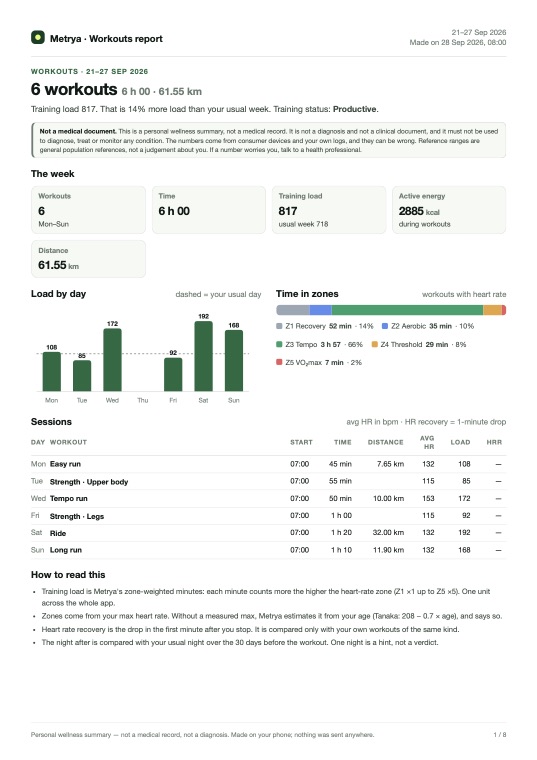
Workouts · one week
Every session of the week drawn out: load by day, time in zones, the heart-rate curve, splits and heart rate recovery.
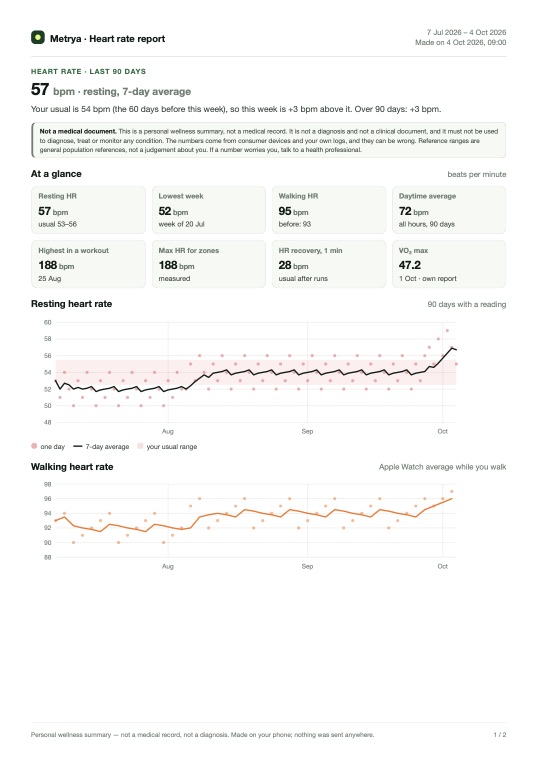
Heart rate · 90 days
Resting and walking heart rate against your usual, your daytime average, max heart rate and recovery after runs.
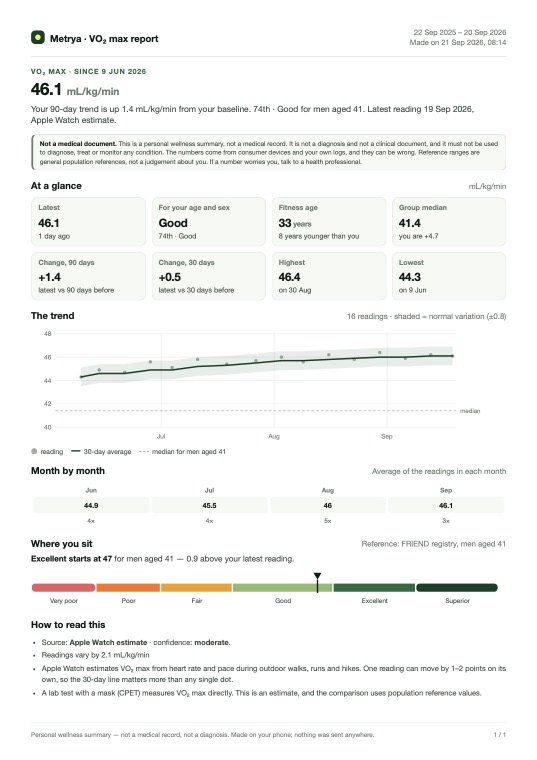
VO₂max · 12 months
Your VO₂max trend, how you compare for your age and sex, and the next level to reach.
Most of Training is free
Pro adds the deeper charts and the files.
- Every workout: heart-rate curve, zones, load, splits, route
- Effort, felt load and main benefit
- Training status and Recovery time
- Today’s target rings
- Strength logger and Strength row
- Best running efforts
- Felt load this week and Zone mix
- Training status chart and the numbers behind it
- Running form and pace vs heart rate
- Heart rate recovery
- Workouts, HRV and heart rate PDFs
- Ask the AI Advisor about a session or a block
Common questions
Which workouts does Metrya read?
Every workout in Apple Health: from your Apple Watch, or from another app or device that writes workouts to Apple Health. You can also log strength workouts in Metrya itself.
How is training load worked out?
Training load is zone-weighted minutes: each minute counts more the higher the heart-rate zone (zone 1 counts ×1, up to zone 5 ×5). On iOS 27 Metrya uses the zones from Apple Health, the same zones your Apple Watch shows. A lift you rated counts at your effort when that is higher.
What is Recovery time?
After a workout, Metrya estimates how long until you are ready for another hard session, with a likely range. Each workout adds hours from its load. A good night takes off a bit more; a short night or HRV off your usual takes off less. Easy activity is fine at any time.
What is training status?
It compares your fitness over the last 6 weeks with your fatigue over the last week: Productive, Maintaining, Overreaching, Unproductive or Detraining. Overreaching needs a big jump in training while your HRV status is Low or Unbalanced. It needs 2 weeks of workouts.
Can I share my training with a coach?
Yes, with Pro. The workouts PDF covers one week, with every session drawn out. The weekly report can be made “for my coach”. Every PDF is made on your iPhone and handed to the share sheet.
What is free?
Every workout’s analysis, effort and felt load, training status, Recovery time, today’s target, best running efforts and the strength logger. Pro adds the zone mix, the charts behind training status, running form, pace vs heart rate, heart rate recovery and the PDFs.
Train hard on the right days.
Free on iPhone.
Metrya reads the workouts your Apple Watch already records. No account, no new sensor.
Metrya is a wellness app, not a medical device. Your health data stays on your devices.