Log your lifts.
Make them count.
A fast set-by-set logger with a rest timer, templates and your last numbers. Saved to Apple Health once, with real heart rate from your Apple Watch, and counted in your training load.
Fast enough to use between sets
One set at a time, with big numbers and buttons you can hit with sweaty hands. Each set starts from what you did last time.
One tap from anywhere
Tap ⊕ and pick Log strength, or one of your last 3 templates. It is also on Activity › Train.
One set at a time
− and + buttons you can hold, then one tap on Set done. Supersets, warm-up, drop and failure sets are in All sets.
A timer that starts by itself
−15 / +15 seconds and skip. When the rest is over you hear a sound, and a notification names your next set.
Your workout on Today
A card shows the workout clock, sets done, kilograms, the rest left and your next set. One tap takes you back.
Time, kilograms and new bests
Rate how hard it was from 1 to 10 and add a note. Then it is saved to Apple Health, once.
Nothing is lost
If the app closes, the workout is still there when you come back, timer included.
Real heart rate, not guesses
Between sets, the Watch checks heart rate only every few minutes. A Watch workout checks every few seconds.
- Start a Strength workout in the Workout app on your Watch, then log your sets in Metrya. Metrya tells you this when you start.
- One workout in Apple Health. When you finish, Metrya waits for the Watch workout and puts your sets on it. It saves nothing new.
- Late Watch sync? Save anyway. When the Watch workout arrives, it takes over and your sets move onto it.
- The workout page says where heart rate came from, so you know how far to trust it.
Lifting finally counts
Heart rate stays low between sets, so a hard leg day used to look like an easy hour. Now your effort counts.
- Training load: a lift you rated counts its minutes at your effort when that is higher than heart rate. Train load, fitness, fatigue and Recovery time all use it.
- Muscles card on Activity › Recover: the groups still recovering, and how long ago you worked them. Estimates from your sets.
- Progress per exercise: your bests and last sessions. The estimated 1-rep max line over 3, 6 or 12 months is Pro.
- Strength row on Train: days you lifted in the last 7, against the WHO guide of 2 or more a week and your own usual.
Everything in the logger
Built for real gym sessions, from a quick upper-body day to a HYROX circuit.
About 130 lifts built in
Including HYROX and CrossFit moves. Not in the list? Create it with its main and other muscles. Rename or delete it later.
Plans you can reuse
Make one from scratch, with kilograms and reps for each set, or save a finished workout. 3 are free, more with Pro.
Supersets and rounds
Join exercises into one superset for (bench press → pull-up → curl) × 3. Rest comes after the round.
Weight per hand
Enter the weight of one dumbbell or kettlebell. The app shows it as “12 kg each”.
Kilograms or pounds
Buttons step 2.5 kg, or 5 lb with imperial units.
Your sets from Hevy
With Pro and your own Hevy key, your Hevy workouts show in the same places. If a workout is in both, Metrya’s log counts.
Lifts in the weekly workouts PDF
Strength sessions sit next to your runs and rides, with time, load and heart rate. This sample has two lifting days.
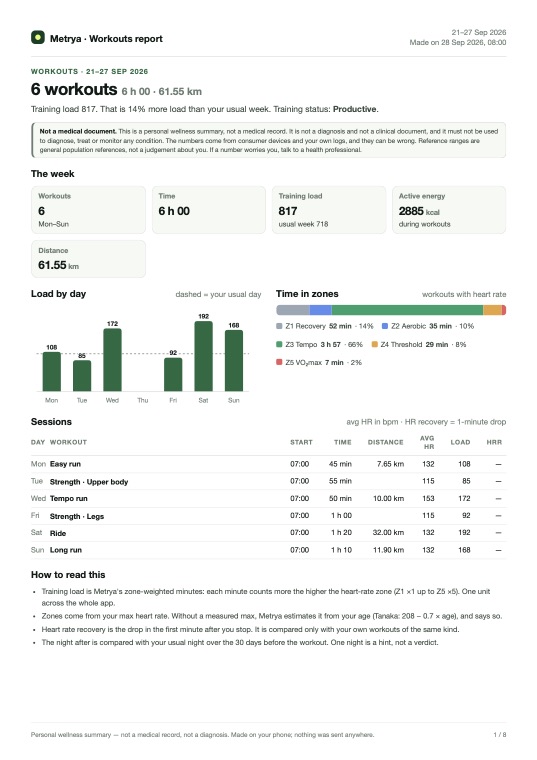
Workouts · one week
Every session of the week drawn out: load by day, time in zones, the heart-rate curve, splits and heart rate recovery.
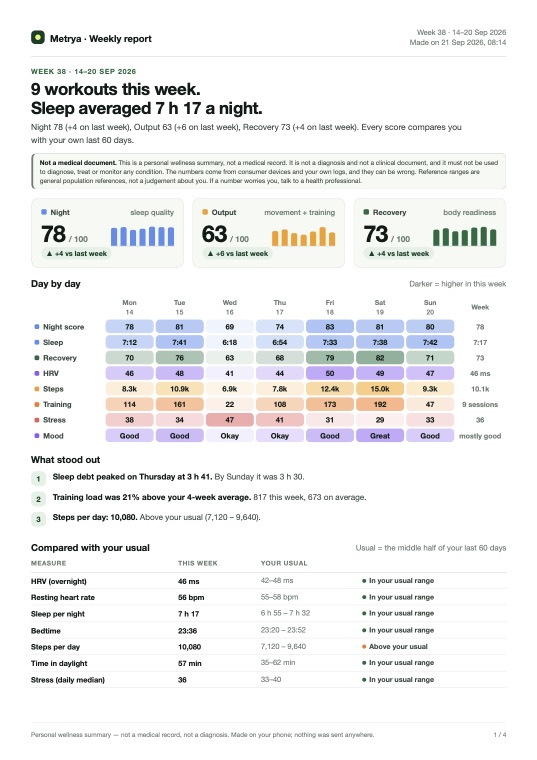
Weekly report
Your last full week: sleep, recovery, training, movement, food, supplements and habits. Made for you, your coach, or sleep only.
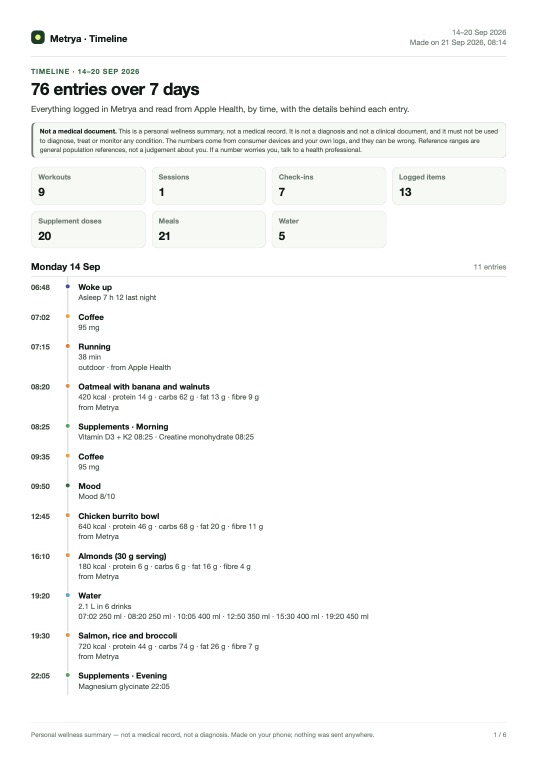
Timeline · 7 to 30 days
Everything you logged or Apple Health recorded, by time: workouts, meals, supplements, water and mood.
The logger is free
You can log every workout without paying. Pro adds the longer view.
- Logging, rest timer and notifications
- Saved to Apple Health, without duplicates
- Guided Apple Watch heart rate
- About 130 exercises, plus your own
- 3 templates
- Bests and last sessions per exercise
- Muscles card and Strength row on Train
- Lifting counted in training load and Recovery time
- Unlimited templates
- Estimated 1-rep max line, 3 / 6 / 12 months
- 14-day Muscle Map
- Sets from Hevy with your own key
- Weekly workouts PDF
- Ask the AI Advisor about your training
Common questions
Is the strength logger free?
Yes. Logging, the rest timer, saving to Apple Health, your own exercises, the Muscles card, bests per exercise and 3 templates are free. Pro adds more templates, the estimated 1-rep max line, the 14-day Muscle Map, Hevy sync and the PDF reports.
Do I need an Apple Watch?
No. Without a Watch you can still log every set, and your effort rating counts in your load. For real heart rate, start a Strength workout in the Workout app on your Watch and log your sets in Metrya. Metrya puts your sets on that Watch workout.
Will I get the same workout twice in Apple Health?
No. If your Apple Watch or another app recorded the same workout, Metrya adds the sets to it and saves nothing new. If the Watch workout arrives later, it takes over and Metrya removes its own copy.
Can I bring my workouts from Hevy?
Yes, with Pro. Hevy sync is experimental. Paste your own Hevy API key in Settings › Data sources › Hevy. It needs Hevy Pro. Your iPhone reads your workouts straight from Hevy and never writes to it. You can disconnect at any time and delete the synced sets.
Why did my lifting look easy before?
Heart rate drops between sets, so a hard session sits mostly in low zones. When you rate a lift, Metrya counts its minutes at your effort if that is higher than heart rate. Never both numbers at once.
Where are my sets stored?
On your iPhone and in your iCloud backup. Metrya has no server, and your sets are not uploaded anywhere.
Your next gym session,
logged in Metrya.
Free on iPhone. Works with your Apple Watch and Apple Health.
Metrya is a wellness app, not a medical device. Your health data stays on your devices.