Your Watch measures. Your iPhone explains. Your Mac looks back over the year. They talk to each other — and to nobody else.
No Metrya server in between. No account to make.
Apple Health
Your Wi-Fi · encrypted with your code
07:06
64
RESERVE
Wear it
07:05
Good morning
Tuesday
82
Recovery
Ready
HRV +12% on your usual
Sleep
7h 12m
Reserve
64
On this iPhone
Why was deep sleep short?
Carry it
Sit down with it
Three roles
Each device does what it is best at.
Not one app squeezed onto three screens. Three apps that know their job — and share one picture of you.
Wear it
Apple Watch owns now
Raise your wrist and you know where you are, without opening a phone.
Reserve, live, refilling and draining from the Watch's own samples
Last night, and Recovery against your usual
Caffeine on board and nutrition targets
Heads Up for air quality and pollen
HoldsToday and last night
Carry it
iPhone owns today
The center of it all. It reads Apple Health and turns it into answers.
Recovery, Sleep, Reserve and Stress every morning
The Advisor — on the phone itself, or on your own key
Meals, caffeine, Stack and workouts, logged in seconds
Your week, and PDFs to keep or share
Holds30 days, a year when needed
Sit down with it
Mac owns the long view
A bigger screen, a bigger model and time to think. Included with Pro.
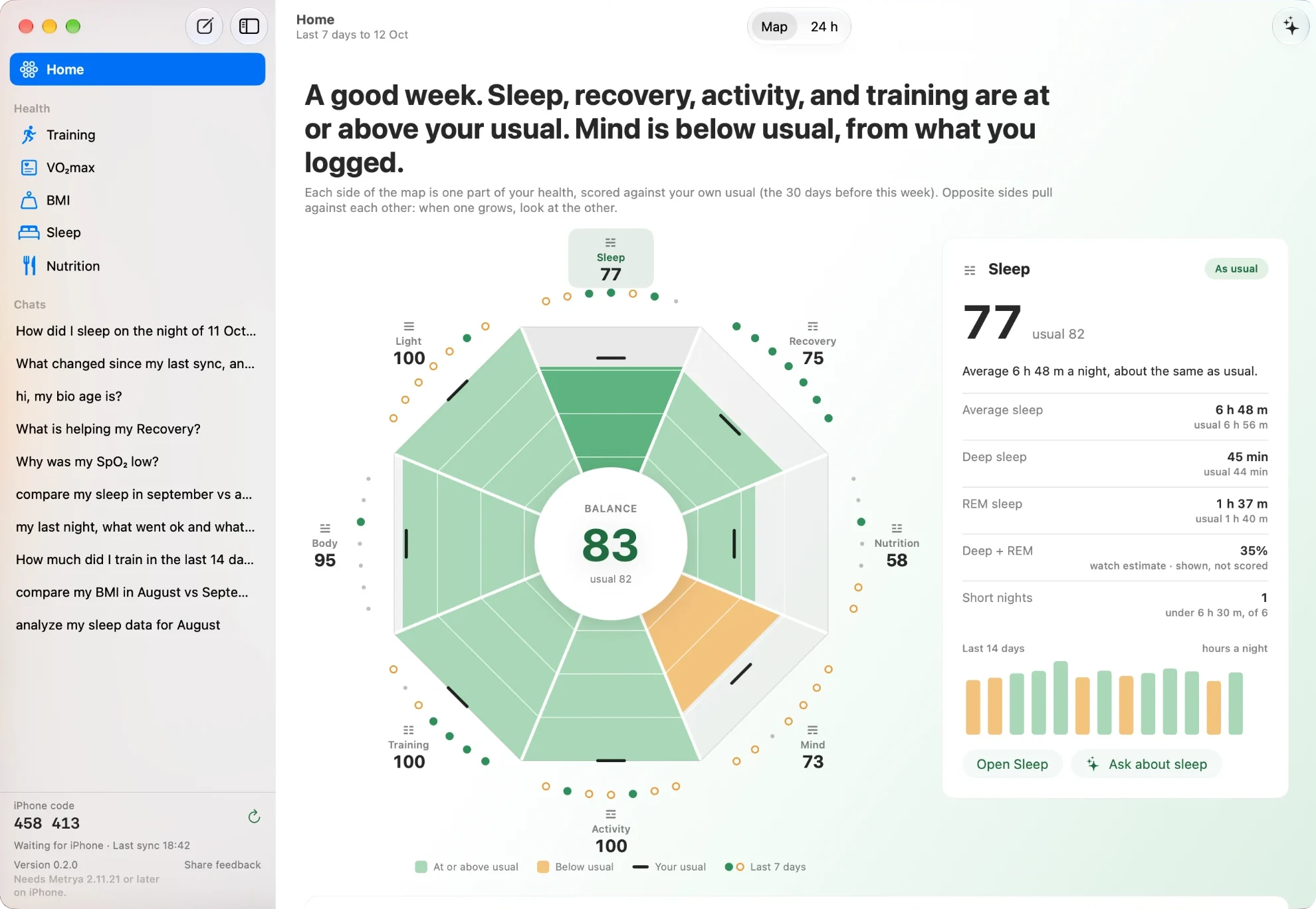
Your week on one map, scored against your usual
Lab: test one change against one number
Routines: a weekly check that speaks only when something changed
Ask in a big window — Apple Intelligence, a local model or your key
HoldsA year, kept on the Mac
One week
Follow one night through all three.
From the moment you fall asleep to a pattern you would never have spotted alone.
Watch
iPhone
Mac
Monday · 23:40 · Watch
You fall asleep. The Watch writes it down.
Sleep stages, heart rate, HRV, breathing and wrist temperature go into Apple Health on your iPhone. That is Apple's own sync, between your own devices.
Last night7 h 12 min
DeepCoreREMAwake
Tuesday · 07:05 · iPhone
Your morning, in three numbers.
Metrya reads the night from Apple Health and scores it against your own usual. This part is plain arithmetic on the phone. No AI, nothing sent.
TodayTuesday
82Recovery
78Sleep
64Reserve
HRV +12% on your usual. A good day for a hard session.
Tuesday · 07:06 · Watch
On your wrist before the coffee.
The phone hands today's numbers to the Watch. From then on, Reserve keeps moving with the Watch's own samples.
On your wristLive
64
Recovery
82
Caffeine on board
0 mg
Heads Up
Pollen high
Tuesday · 07:10 · iPhone
You ask why.
A model you downloaded to the iPhone answers from your own nights. It works in Airplane Mode, because it never needs the network.
Why was deep sleep short this week?
Deep sleep averaged 48 min — your usual is 64. On the three short nights, your last coffee was after 16:00. On the other four, it was before 14:00.
Sleep stagesCaffeine logQwen · on this iPhone
Tuesday · 08:30 · iPhone → Mac
The Mac catches up, over your Wi-Fi.
With Keep in sync on, the phone sends its stored days while the app is open. Tap Send and it adds a year of history. It travels encrypted with your pairing code, straight to the Mac.
Settings › MacPaired
Keep in syncOn
Last sync08:30
RouteWi-Fi → Studio
Next Monday · Mac
A Routine speaks up — because something changed.
Sleep week runs every Monday. The Mac works out every number. The model only writes the words, and every number in them is checked. A quiet week stays quiet.
Routine · Sleep weekNew
17 min less
Your bedtimes moved around less this week.
One thing to try: lights out within the same half hour on three more nights.
Numbers by the MacWords by Gemma 12B5 of 5 checks
A month later · Mac
Lab answers a question you asked.
Magnesium at night, against deep sleep. Lab compares the nights with it and without it, then tries again. These are patterns in your own days, not proof.
Lab · Magnesium → deep sleepPointed the same way
With it · 14 nights1 h 18 min
Without it · 16 nights1 h 07 min
Try 1: 11 min moreTry 2: 8 min moreReceipt · 30 days used
What travels
Every line, drawn. Including the one that isn't there.
Here is every path your health data can take. Solid lines are always on. Dashed lines only happen if you turn them on.
Watch ↔ iPhone. Through Apple Health and the Watch app, device to device.
iPhone → Mac. Your Wi-Fi only, encrypted with a 6-digit pairing code.
Mac → iPhone, if you allow it. Only adds meal favourites. Off until you turn it on.
iPhone → your iCloud, if you want. An encrypted backup in your own account.
To your AI provider, only with your own key. Only that question's data, shown to you first.
Metrya server. There isn't one. No account either.
No account
Nothing to sign up for on any device. Pro comes from your Apple ID.
Off stays off
A data type you turned off for the AI on the iPhone stays out of every answer on the Mac.
A send only reads
Sending to the Mac does not change anything on your phone.
Small, honest extras
Heads Up looks up the weather for a rough location. Food search asks a food database. No health data goes with them.
Same you, different depth
A glance, a day, a year.
Apple Watch
iPhone
Mac
Best for
A glance at your wrist
Your morning and quick questions
A weekly sit-down
History
Today and last night
30 days kept, a year read when a screen needs it
A year, kept on the Mac
The AI
None — the phone does the thinking
Apple Intelligence, a model on the iPhone, or your own key
Apple Intelligence, a local model in Ollama, or your own key
What it adds
Live Reserve, caffeine, Heads Up
Scores, Advisor, logging, PDFs
Map, Lab, Routines, big-window Ask
Comes with
The iPhone app
Free · Pro adds the AI
Pro · beta · macOS 26
Set up
Pair once. Then forget it.
Pair
Open Metrya on the Mac. It shows a six-digit code. On the iPhone, go to Settings → Mac and type it.
Send
Tap Send everything once. After that, Keep in sync keeps the Mac current while the app is open.
Look and ask
The Mac answers from its own copy, so your iPhone can stay in your pocket.
On your Mac
458413
Without the code, the connection is refused — in both directions.
Start with the phone. Add the rest when you want.
Metrya is free on iPhone, with an Apple Watch app. Pro adds the AI — and the Mac app, at no extra cost.